
Affiliate Disclosure: This post contains Amazon affiliate links. If you click and purchase, we earn a small commission at no extra cost to you. We only recommend products we genuinely review.
If you’re looking for a reliable, feature-packed smart door lock for your home, the Qubo Smart Door Lock by Hero Electronix is one of the best options available in India today. In this complete guide, we’ll walk you through everything — from unboxing to full Qubo smart door lock installation, fingerprint enrollment, app pairing, and troubleshooting tips.
Whether you’re a tech enthusiast doing a DIY upgrade or a first-time smart lock buyer, this post has you covered with step-by-step instructions, a full specs table, pros & cons, and a comprehensive FAQ section.

📋 Table of Contents
- What is the Qubo Smart Door Lock?
- Qubo Smart Door Lock Installation — Step-by-Step
- Smart Door Lock Fingerprint Setup
- Hero App Pairing & Wi-Fi Setup
- PIN Code & RFID Card Setup
- Full Technical Specifications Table
- Pros & Cons
- Pro Tips & Maintenance
- Frequently Asked Questions (FAQ)
- Final Verdict
1. What is the Qubo Smart Door Lock?
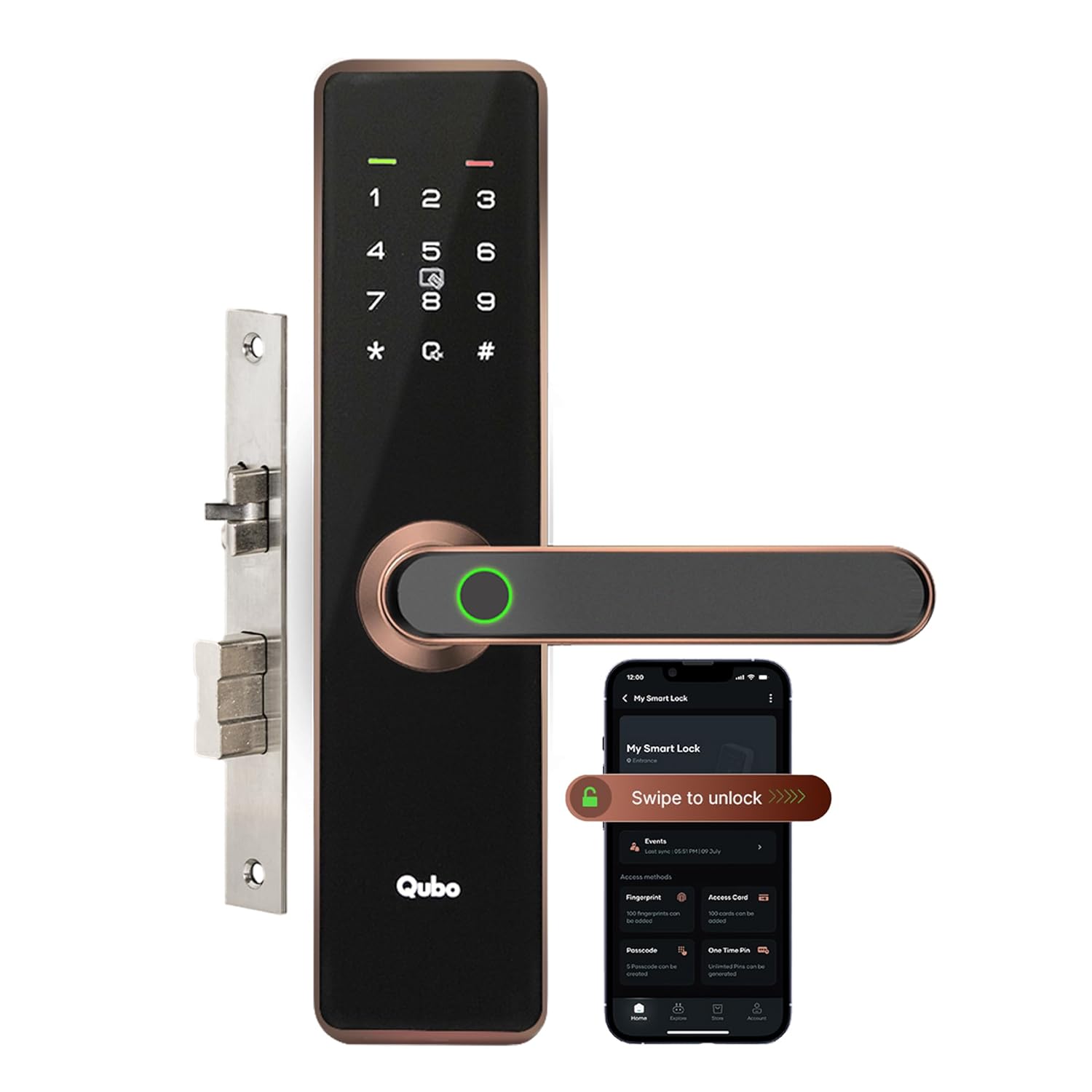
The Qubo Smart Door Lock is a Wi-Fi and Bluetooth-enabled digital door lock developed by Hero Electronix, a subsidiary of the Hero Group — one of India’s most trusted conglomerates. It combines premium security technology with an affordable price point, making it the go-to door smart lock for modern Indian homes and apartments.
The lock offers six different unlocking methods:
- 🔏 Fingerprint biometrics — ultra-fast recognition in under 0.5 seconds
- 📱 Mobile app — Bluetooth & Wi-Fi remote control
- 🔢 PIN code — 4 to 8 digit customizable codes
- 💳 RFID card/fob — tap-to-unlock convenience
- 📩 OTP sharing — time-limited codes for guests via app
- 🗝️ Mechanical key — traditional backup key

2. Qubo Smart Door Lock Installation — Complete Step-by-Step Guide
The Qubo smart door lock installation process is designed for DIY setup and can be completed in 30–45 minutes without any professional help. Here’s exactly how to do it.
Tools & Contents in the Box
- Outdoor lock body (fingerprint/keypad side)
- Indoor lock body (turn knob side)
- Latch bolt assembly + strike plate
- Mounting screws & anchor bolts
- 4 AA batteries (pre-included)
- 2 emergency backup keys
- 2 RFID cards
- Paper door template + quick-start manual
- Phillips screwdriver (provided)
Pre-Installation Door Check
Before starting, confirm your door meets these requirements:
- ✅ Door thickness: 35mm – 55mm
- ✅ Backset: 60mm or 70mm
- ✅ Bore hole diameter: 54–60mm
- ✅ Door surface: flat & vertical (wood, metal, aluminium)
Step-by-Step Installation
Step 1 — Prepare the Door Bore Hole
Use the provided paper template to mark the exact position for the bore hole. If replacing an existing lock, check that the hole is 54–60mm in diameter. For new installations, use a 54mm hole saw at the standard position. Drill the smaller 22mm edge hole for the latch bolt.
Step 2 — Install the Latch Bolt
Insert the latch bolt into the door edge hole. Make sure the angled (beveled) face of the latch faces the door frame direction. Screw it in firmly with the provided screws. Test the latch movement — it should slide in and out smoothly.
Step 3 — Thread the Connecting Cable
Pass the flat connecting cable through the main bore hole from one side. This cable connects the outdoor (keypad) unit to the indoor (motor) unit electronically.
Step 4 — Mount the Outdoor Lock Body
Place the fingerprint/keypad unit against the exterior side of the door. Align the spindle rod with the latch bolt hole. Insert the two long mounting screws from the inside and hand-tighten. Confirm the unit is level before fully tightening.

Step 5 — Mount the Indoor Lock Body & Insert Batteries
Attach the indoor unit. Connect the cable firmly until it clicks. Open the battery cover and insert 4 fresh AA alkaline batteries. The screen will illuminate and the lock will play a startup chime — installation is complete!
Step 6 — Install the Strike Plate
Mark the latch position on the door frame. Chisel a shallow recess if needed. Screw the strike plate into the frame. Close the door and test that the latch engages cleanly without resistance.
💡 Pro Installation Tip: Apply a small amount of graphite powder or WD-40 to the latch bolt before installation. This ensures smooth operation for years without squeaking or sticking.
3. Smart Door Lock Fingerprint Setup
The smart door lock fingerprint sensor is the standout feature of the Qubo lock. It uses a semiconductor optical scanner that stores up to 100 fingerprints and identifies them in under 0.5 seconds — even for slightly worn or damp fingers.

How to Register Fingerprints
- Enter Admin Mode: Press and hold * for 3 seconds → enter default Admin PIN (123456) → press #
- Select Fingerprint Enroll: Press 1 then # → LED ring turns blue
- Scan Finger 5 Times: Place and lift your finger on the sensor 5 times, varying the angle slightly each time
- Confirm: Green LED + double beep = success. Red LED = retry (clean sensor with dry cloth)
- Repeat for all family members (up to 100 prints, User IDs 01–99)
- Exit: Press * three times to exit admin mode. Test each fingerprint.
👆 Best Practice: Register both index fingers for every user as a backup. For elderly family members with faint prints, register all 10 fingers if needed.
4. Qubo Hero App Setup & Wi-Fi Pairing
The Qubo Hero app (Android & iOS) gives you full remote control over your door smart lock. Here’s how to pair it:
- Download “Qubo” from the Google Play Store or Apple App Store
- Create an account with your mobile number and verify via OTP
- Tap “+” → Select “Smart Door Lock” → Enable Bluetooth
- The app discovers the lock — tap it → Enter admin PIN on keypad to confirm pairing
- Go to Device Settings → Wi-Fi → Select your 2.4GHz network (5GHz is not supported)
- Enable push notifications, set Auto-Lock timer, and configure guest OTP sharing

5. PIN Code & RFID Card Setup
Beyond fingerprints, the Qubo door smart lock supports up to 200 PIN codes and 200 RFID cards.
Adding a PIN Code
- Enter Admin Mode (hold * → Admin PIN → #)
- Press 2 then # → Enter User ID (01–99) → #
- Enter new PIN (4–8 digits) → # to save
Anti-Peep Feature: Type random digits before and after your actual PIN — the lock reads only the correct 4–8 digit sequence within any longer input, preventing shoulder-surfing.
Adding an RFID Card
- Enter Admin Mode → Press 3 then #
- Enter User ID → # to confirm
- Hold the RFID card close to the fingerprint area until you hear a beep
- Green LED = card registered successfully
6. Full Technical Specifications
| Specification | Details |
|---|---|
| Brand | Qubo by Hero Electronix |
| Unlock Methods | Fingerprint, App, OTP, PIN, RFID, Key (6 methods) |
| Fingerprint Capacity | 100 fingerprints |
| PIN Capacity | 200 PIN codes (4–8 digits) |
| RFID Cards | 200 cards (13.56MHz MIFARE) |
| Recognition Speed | ≤ 0.5 seconds |
| Connectivity | Bluetooth 4.2 + Wi-Fi 2.4GHz |
| Encryption | AES 128-bit |
| Battery | 4 × AA, 6–12 months life |
| Emergency Charging | USB-C external power bank |
| Door Thickness | 35mm – 55mm |
| IP Rating | IP65 (dust + water resistant) |
| Tamper Alert | Yes — vibration sensor + app + alarm |
| Voice Assistant | Amazon Alexa, Google Home |
| Auto-Lock | 30 seconds – 5 minutes |
| Material | Zinc alloy, anti-fingerprint matt finish |
| Warranty | 1 Year Brand Warranty |
7. Pros & Cons
✅ Pros
- 6 unlock methods — never get locked out
- Sub-0.5 second fingerprint recognition
- Real-time app alerts for all events
- Anti-peep PIN scrambling keyboard
- IP65 weather-proof — monsoon-ready
- Emergency USB power bank charging
- Guest OTP sharing via app
- Works with Alexa & Google Home
- Easy 45-minute DIY installation
- Competitive pricing vs international brands
❌ Cons
- Only 2.4GHz Wi-Fi supported (no 5GHz)
- Remote features require internet
- Spring latch only (no built-in deadbolt)
- Bluetooth range limited to ~10m
- App can occasionally be slow to connect
8. Pro Tips & Maintenance
- 🔋 Battery Health: Use branded alkaline batteries (Duracell, Energizer). Avoid rechargeable NiMH batteries — they have lower voltage and may cause erratic behavior.
- 👆 Fingerprint Accuracy: Re-enroll prints every 6 months or after any injury to your fingertip. Clean the sensor glass monthly with a soft microfibre cloth.
- 🔐 Change Default Admin PIN: Change the default Admin PIN (123456) immediately after setup. Use a unique 6–8 digit code that is not your birth year or phone number.
- 📶 Wi-Fi Placement: If the lock disconnects frequently, move your Wi-Fi router closer or use a Wi-Fi extender. Thick walls and metal doors can reduce signal strength.
- 🧴 Lubrication: Apply graphite lubricant to the latch bolt every 12 months for smooth mechanical operation. Avoid oil-based lubricants near electronic components.
- 📱 App Updates: Keep the Qubo Hero app updated to the latest version for security patches and new feature access.
9. Frequently Asked Questions (FAQ)
How long does Qubo smart door lock installation take?
For a standard DIY installation replacing an existing lock, the process takes 30–45 minutes. If you’re drilling a new bore hole, add 15–20 minutes. No professional locksmith is needed — all required tools are included in the box.
How many fingerprints can the Qubo smart door lock fingerprint store?
The Qubo smart door lock fingerprint sensor stores up to 100 unique fingerprints. We recommend registering two fingers per person (both index fingers) for reliable backup access.
Does the door smart lock work without internet?
Yes! The Qubo door smart lock works fully offline using fingerprint, PIN, RFID card, and mechanical key. Internet is required only for remote app access, OTP sharing, and push notifications. Bluetooth app control works within ~10 metres without internet.
What happens when the Qubo smart lock battery dies?
You’ll get a low battery push notification in advance. If the battery fully dies, use the two backup keys or hold a 9V/USB power bank against the external charging port at the bottom of the lock to temporarily power it for PIN or fingerprint unlocking.
Is the Qubo smart door lock waterproof?
Yes — the lock has an IP65 rating, meaning it is fully dust-tight and water-resistant against direct water jets. It operates between -20°C and 70°C, making it ideal for all Indian weather conditions including monsoon season.
Can I share access with guests using the Qubo door smart lock?
Yes! The Qubo Hero app’s OTP Sharing feature lets you generate time-limited PIN codes and share them via WhatsApp, SMS, or email. Set the validity window (e.g., 2 PM–6 PM) and the code expires automatically — no physical key needed.
Does Qubo smart lock support 5GHz Wi-Fi?
No — the Qubo smart lock only supports 2.4GHz Wi-Fi. Connect to your router’s 2.4GHz band (often labelled “NetworkName_2.4G”). Dual-band routers broadcast both bands separately.
What is the warranty on the Qubo smart door lock?
Qubo provides a 1-year manufacturer warranty against defects. Warranty claims are handled by Qubo Hero support. Extended warranty plans may be available via Amazon at time of purchase.
Is Qubo smart door lock compatible with wooden and metal doors?
Yes — compatible with wooden, hollow metal, and aluminium doors between 35–55mm thick. For metal doors, use HSS or cobalt drill bits for bore hole creation. Not recommended for glass doors.
Will the fingerprint sensor work for elderly people with faint prints?
The semiconductor optical scanner handles faint or partial prints better than older capacitive sensors. For elderly users, register all 10 fingers if possible. PIN code or RFID card are excellent alternatives for consistent, reliable access.
10. Final Verdict — Is the Qubo Smart Door Lock Worth It?

The Qubo Smart Door Lock delivers excellent value for Indian homes. With six unlock methods, a sub-0.5-second fingerprint scanner, IP65 weather resistance, and seamless app integration, it competes head-to-head with international brands at a significantly lower price point.
The Qubo smart door lock installation is genuinely DIY-friendly — no electrician or locksmith needed. The smart door lock fingerprint accuracy is impressive, and the OTP guest-sharing feature is a genuine everyday convenience. The only notable limitations are the lack of 5GHz Wi-Fi support and the spring latch (vs. deadbolt) configuration.
We rate it 4.5/5 ⭐ — highly recommended for apartments, villas, and offices in India.
Ready to Upgrade Your Home Security?
Get the Qubo Smart Door Lock from Amazon with fast delivery and genuine warranty. 🛒 Buy on Amazon — Check Latest Price →
Affiliate link — we earn a small commission at no extra cost to you
Product Gallery


Disclosure: As an Amazon Associate, we earn from qualifying purchases. Product prices and availability are accurate as of the date published and are subject to change.